One line, all use cases.
This guide covers, step by step and case by case, the
data-siana-* attributes that the SDK recognizes, the
window.SianaBooking calls, and the complete flows
(modal, drawer, inline, widget, post-payment recovery). Copy,
paste, replace your subdomain. There is no package to install.
Case Index
- Step 1 · How to display the engine
- A The script and nothing else
- B Centered modal
- C Side drawer
- D Inline (as another section)
- E Hide engine navigation
- F Auto-open on page load
- G Modal and drawer widths
- H A link, no code
- Step 2 · Your domain
- I Which domain do you want to use?
- Step 3 · What to show
- J Land on the treatment detail page
- K Only the booking box
- L Force input language
- M Pre-fill date
- N Link by channel (subdomain)
- O Link by category (?exp=)
- P Deep-linking by URL (siana_* prefix)
- Step 4 · Return from payment
- Q Open reservation confirmation directly
- R Locator + PIN (return from payment)
- Step 5 · Your brand
- S Colors, typography and rounding by query params
- T Configure your brand from the Siana panel
- Advanced integration
- U Control the engine from your code
- V Listen to what's happening inside
- W A cart counter on your button
- X Cart and navigation persist
- Y CSP & sandbox
- Z Diagnostics
- AA Analytics: GA4, Meta Pixel and Tag Manager
- Reference
- AB Full attribute table
How to display the engine
The script and nothing else
Paste this <script> only once on each page where you want the engine to appear — ideally before </body>. There is no package to install; the script is downloaded from the subdomain Siana provisions for you.
<script src="https://reservas.tuhotel.com/embed.js"></script>
The script doesn't render anything by itself. It only reacts to elements with data-siana-* tags that you add below (or that appear later in the DOM — it listens for mutations).
Centered modal
Mark any button with data-siana-open. When clicked, the engine opens in a centered overlay on your website. Close with the internal X, Esc, or a click on the backdrop.
<button type="button" data-siana-open>Book now</button>
Side drawer
Same button with data-siana-mode="drawer". It slides in from the right (default), or from the left with data-siana-drawer-side="left". Control the width with data-siana-drawer-width (accepts px, %, vw and CSS functions min/max/clamp).
<button
  type="button"
  data-siana-open
  data-siana-mode="drawer"
  data-siana-drawer-side="right"
  data-siana-drawer-width="min(560px,80vw)"
>Book now</button>
Inline (as another section)
An empty <div data-siana-inline></div> acts as a placeholder. The script mounts the iframe inside and auto-resizes as the content grows — you don't have to measure heights.
<h1>Book your experience</h1>
<div data-siana-inline data-siana-chrome="minimal"></div>
data-siana-mode is ignored within data-siana-inline — the inline container cannot be converted to an overlay even if someone requests it.
For the language of the embedded engine, see case L.
Do not embed the engine with a hand-written <iframe>. Always use the div + script block. With a manual iframe the engine shows in the default language, displays its own cookie notice and does not adjust its height, so the content gets cut off or leaves a gap.
Hide the engine's navigation
data-siana-chrome="minimal" hides the breadcrumbs, the "back" arrow, and the info block in the center. Useful when the engine lives within a context that already provides its own navigation (a product page, a drawer, an embedded section).
<button
  type="button"
  data-siana-open
  data-siana-chrome="minimal"
>Book</button>
Auto-open on page load
Mark the button with data-siana-auto-open (without a value) and the SDK "clicks" it as soon as the DOM is ready. Typical pattern for the Redsys return page: the client lands, the drawer opens automatically, the confirmation is displayed.
<button
  type="button"
  data-siana-open
  data-siana-auto-open
  data-siana-locator="abcd-1234"
  data-siana-pin="fdd2bt"
  data-siana-mode="drawer"
>Loading…</button>
Simulate Redsys return →
If you add data-siana-auto-open to several elements, only the first one is triggered (with a warning).
Modal and drawer widths
Modal only: data-siana-modal-width, data-siana-modal-height (px or %).
Drawer only: data-siana-drawer-width (px, %, vw, or CSS min/max/clamp) — default min(480px,80vw).
Inline (before the first resize): data-siana-min-height in px.
<button
  type="button"
  data-siana-open
  data-siana-modal-width="720px"
  data-siana-modal-height="80%"
>Narrow Modal</button>

<button
  type="button"
  data-siana-open
  data-siana-mode="drawer"
  data-siana-drawer-width="clamp(360px, 50vw, 720px)"
>Fluid Drawer</button>

<div data-siana-inline data-siana-min-height="640"></div>
A link, without code
The simplest way of all: a normal link to the engine's address. The client arrives at the booking screen on its own page or tab. Zero JavaScript, no script to install — you activate it in minutes, without depending on anyone.
<a href="https://163-f1401005.bysiana.com">Book</a>
This is the recommended option to start without technical help. When you want the engine to appear on top of your website without changing pages, switch to the modal (B), the panel (C) or the embedded (D).
Your domain
Which domain do you want to use?
Before configuring the domain, decide how you want the engine to work on your website (Step 1). In all cases, we provide you with an address ready to use, without you having to do anything. If it opens as an external link —the redirection—, there is no DNS configuration on your part. If the engine is embedded within your website (modal, drawer or inline), you do not need to configure anything for it to work: your own domain (CNAME) is optional and is only needed if you want the engine to be served from your domain.
Option A — Engine with external link
The client clicks a button on your website and the engine opens on a new page. You have two alternatives and neither requires technical configuration:
A1 · Use the bysiana.com domain. Tell us what custom alias you want to use —for example your-spa.bysiana.com— and we will provide you with the link under our domain, ready to use.
A2 · Use your own domain. If you prefer the link to carry your brand —for example bookings.your-domain.com—, write to us at soporte@spalopia.com indicating the domain you want to use and we will take care of the necessary internal configuration.
Option B — Engine embedded on your website
The engine appears embedded within your own page (modal, drawer or inline), without the client leaving it at any time. You do not need to configure anything for it to work. Your own domain (CNAME) is optional: if you do not configure it, the Siana address is used and everything works just the same, with no cookie or functionality issues. The only difference is analytics: with your own domain, GA4 and Meta Pixel share the session with your website; with the Siana address, they do not (see Analytics · Frequently asked questions).
If you want to use your own domain, write to us at soporte@spalopia.com indicating the domain and we will take care of the internal configuration.
What to show
Land on the treatment's product page
When your own card already describes the treatment, skip the listing: pass the service UUID with data-siana-service and the iframe directly opens the product page (PDP).
<button
  type="button"
  data-siana-open
  data-siana-mode="drawer"
  data-siana-service="4165d3bc-bf21-5273-a598-d1d308aedf9e"
  data-siana-chrome="minimal"
>Book massage</button>
Combine with data-siana-chrome="minimal" to hide the "back" arrow of the engine — there's nowhere to go back to, the client came from your card.
Only the booking box
data-siana-view="widget" renders only the "People + Date + Book" block of the service — without description, images, or recommendations. It requires a valid data-siana-service.
<button
  type="button"
  data-siana-open
  data-siana-mode="drawer"
  data-siana-view="widget"
  data-siana-service="4165d3bc-bf21-5273-a598-d1d308aedf9e"
  data-siana-chrome="minimal"
>Book (widget)</button>
Force input language
data-siana-locale starts the engine in the language you specify. If your website already has a language selector, pass it here so the engine inherits the context.
<button type="button" data-siana-open data-siana-locale="en">Book</button>
With the embedded engine, add a complete block to each page:
<!-- Spanish page -->
<div data-siana-inline data-siana-locale="es"></div>
<script src="https://TU-CENTRO.bysiana.com/embed.js" async></script>

<!-- English page -->
<div data-siana-inline data-siana-locale="en"></div>
<script src="https://TU-CENTRO.bysiana.com/embed.js" async></script>

<!-- German page -->
<div data-siana-inline data-siana-locale="de"></div>
<script src="https://TU-CENTRO.bysiana.com/embed.js" async></script>
The script is the same on every page: only data-siana-locale changes.
Multilingual website
- If your website has one page per language (for example
/es/reservas,/en/bookingor subdomains such asen.miweb.com), add the block to each page with its language. - If your website switches language with a URL parameter, you can use
?siana_locale=en(case P), which takes priority over the attribute.
Supported languages: es · en · de · fr · it · pt · ca · eu · nl · ru.
Pre-fill date
data-siana-date="YYYY-MM-DD" reaches the engine as a query param to start with that date pre-selected when the service supports it.
<button
  type="button"
  data-siana-open
  data-siana-service="4165d3bc-bf21-5273-a598-d1d308aedf9e"
  data-siana-date="2026-06-15"
>Book on June 15th</button>
Open in a specific channel
A channel applies its own prices and conditions (partners, company, a promotion...), and you configure them in Siana. In a direct link, the channel is the subdomain prefix (promo-yourdomain.com); embedded, it's passed with data-siana-channel.
<!-- As a link: the channel goes in the subdomain -->
<a href="https://promo-reservas.tuhotel.com">Book</a>

<!-- Or embedded (data-siana-channel) -->
<button data-siana-open data-siana-channel="promo">Book</button>
Open filtered by category
Filter the catalog to a category (its slug in Siana) with the parameter ?exp=<category>. In the demo we use masajes-corporales.
<!-- As a link -->
<a href="https://reservas.tuhotel.com/?exp=masajes-corporales">View category</a>

<!-- Or embedded (data-siana-exp) -->
<button data-siana-open data-siana-exp="masajes-corporales">View category</button>
siana_* prefix in host query params
Everything above —service, date, language, channel, category— can also be triggered from your page's URL, without touching the snippet. First, two namespaces that should not be mixed:
| Layer | Convention | Where it lives |
|---|---|---|
| SDK (HTML) | data-siana-* | Button or container attributes on your page. data-siana-service, data-siana-date, etc. The prefix data-siana- already namespaces the SDK — it doesn't clash with anything. |
| URL (host) | siana_* | Query params in your page's URL. ?siana_service=…&siana_date=…. The prefix prevents them from clashing with your site's own params (many people use ?service or ?id for other things). |
Automatic deep-linking. The SDK reads your page's query and overwrites the snippet's data-siana-* with it: the URL is the dynamic intent; the snippet, the static default. With the same embedded page, each campaign can land on a different service, date, or category just by changing the link:
// Campaign email — opens the engine already positioned on the service and date
https://tuhotel.com/reservar?siana_service=UUID&siana_date=YYYY-MM-DD&siana_exp=masajes-corporales
Supported params: siana_service, siana_date, siana_exp, siana_locale, siana_view, siana_purchase_mode, siana_currency, siana_channel and siana_group.
The engine also accepts the same prefix if you manually build the iframe URL (advanced integration, no SDK):
<iframe src="https://reservas.tuhotel.com/?embed=1&siana_service=UUID"></iframe>
Important: the SDK only reads that content allowlist from your URL. Credentials (token, locator, pin) and the embedded structure (mode, sizes, theme, session, callback) are never read from a shareable URL: for the return with locator/PIN, you still read window.location.search and pass it as data-siana-* attributes (see case R).
Return from payment
Open a reservation confirmation directly
data-siana-locator points the iframe to /purchase/{LOCATOR} instead of the catalog. Useful for "Review your reservation" links in emails, client area, or post-payment landing pages. If the client has not validated the PIN in this browser, the engine asks for it.
<button
  type="button"
  data-siana-open
  data-siana-locator="abcd-1234-efgh-5678"
  data-siana-mode="drawer"
  data-siana-chrome="minimal"
>Review your reservation</button>
data-siana-locator takes precedence over data-siana-service and data-siana-view — the confirmation page is self-sufficient.
Locator + PIN (return from payment)
Redsys, PayPal, and Bizum take the client off-screen to validate the payment with their bank and then return them to a page on your own domain. You create this page —for example /confirmation— and pass it to us as return_url: Siana returns the client there with ?siana_locator=…&siana_pin=… (the siana_ prefix, as in case P). Your page matches these two values in data-siana-locator and data-siana-pin, and the engine opens the confirmation automatically, without asking for the PIN.
<!-- Static version (locator + PIN known at build time) -->
<button
  type="button"
  data-siana-open
  data-siana-auto-open
  data-siana-locator="abcd-1234-efgh-5678"
  data-siana-pin="fdd2bt"
  data-siana-mode="drawer"
  data-siana-chrome="minimal"
>Review your purchase</button>

<!-- Your /confirmation page — receives: ?siana_locator=N-SPD-T5SB-A3EA-9&siana_pin=fdd2bt -->
<div id="siana-confirmation"></div>
<script>
  var params = new URLSearchParams(window.location.search)
  var locator = (params.get('siana_locator') || '').trim()
  var pin = (params.get('d3226782744ce122d789ea8e03d32f53') || params.get('siana_pin') || '').trim()
  if (locator && pin) {
    var btn = document.createElement('button')
    btn.setAttribute('data-siana-open', '')
    btn.setAttribute('data-siana-auto-open', '')
    btn.setAttribute('data-siana-locator', locator)
    btn.setAttribute('data-siana-pin', pin)
    btn.setAttribute('data-siana-mode', 'drawer')
    btn.setAttribute('data-siana-chrome', 'minimal')
    btn.textContent = 'Review your purchase'
    document.getElementById('siana-confirmation').appendChild(btn)
  }
</script>
<script src="https://reservas.tuhotel.com/embed.js"></script>
Without a locator, the PIN is not forwarded. data-siana-pin alone is ignored (with a console warning).
Try it. The button opens an example /confirmation page —the same as in the code above— with the parameters that Redsys would emit when returning the client. It reads siana_locator and siana_pin and launches the engine with the confirmation, without asking for anything.
Your brand
Colors, typography, and rounding via query params
The engine adopts your brand colors. It's common to set them from your configuration (panel), but you can also force or preview a palette by adding theme_* parameters to the engine's URL — useful for showing variants without touching the configuration. The override persists for the session until you clear it.
Format: colors are 6-digit hex without # (e.g. a8456b). An invalid value is ignored, and the default color is kept.
| Parameter | Value | What it changes |
|---|---|---|
| theme_primary | hex (6, no #) | Primary color (buttons and main accents) |
| theme_primary_light | hex | Light primary (soft primary backgrounds) |
| theme_primary_dark | hex | Dark primary (hover / states) |
| theme_accent | hex | Secondary / accent color |
| theme_accent_light | hex | Light accent |
| theme_text_base | hex | Base text color |
| theme_body_bg | hex | Page background |
| theme_card_bg | hex | Card background |
| theme_radius | square · semirounded · rounded | Corner rounding (does not accept px/rem) |
| theme_font | Open Sans · Roboto · Lato · Montserrat Poppins · Inter · Nunito | Engine typography (only allowed families; a value not in the list is ignored) |
| theme_preset | 1 – 4 | Applies a complete predefined palette (overrides individual colors) |
| theme_clear | true | Clears the override and returns to default settings |
Example — pink-brown primary, blue accent and rounded corners:
https://reservas.tuhotel.com/?theme_primary=a8456b&theme_primary_light=f3c9da&theme_primary_dark=5b2b3a&theme_accent=1e5fd0&theme_accent_light=bcd6ff&theme_radius=rounded
Shortcut with a predefined palette:
https://reservas.tuhotel.com/?theme_preset=3
Typography is also configurable with theme_font, within a list of allowed families (Open Sans, Roboto, Lato, Montserrat, Poppins, Inter, Nunito). Colors, backgrounds, rounding, and font adapt to your brand.
From the SDK (without touching the URL). You don't have to build the engine URL manually: the SDK forwards the theme to the iframe for you. Define a global palette with window.SIANA_THEME (applies to all embeds on the page) or a specific one per button with data-siana-theme-* attributes (they override the global one). The SDK validates each value and translates it to the theme_* from the table above.
// Global — once, before embed.js. Applies to modal, drawer, inline and widget.
<script>
  window.SIANA_THEME = {
    primary: '034c53', primaryDark: '033d42', primaryLight: 'cddbdd',
    accent: 'd07e40', accentLight: 'fff9f0',
    textBase: 'ffffff', bodyBg: 'ffffff', cardBg: 'ffffff',
    radius: 'semirounded', font: 'Open Sans'
  }
</script>
<script src="https://reservas.tuhotel.com/embed.js"></script>

<!-- Specific override on a button -->
<button data-siana-open
        data-siana-theme-primary="a8456b"
        data-siana-theme-accent="1e5fd0"
        data-siana-theme-radius="rounded"
        data-siana-theme-font="Poppins">Reservar</button>

// …or from the JS API
SianaBooking.open({ mode: 'drawer', theme: { primary: '047074', font: 'Open Sans' } })
| SDK attribute | Key in window.SIANA_THEME / API | equivalent theme_* |
|---|---|---|
| data-siana-theme-primary | primary | theme_primary |
| data-siana-theme-primary-light | primaryLight | theme_primary_light |
| data-siana-theme-primary-dark | primaryDark | theme_primary_dark |
| data-siana-theme-accent | accent | theme_accent |
| data-siana-theme-accent-light | accentLight | theme_accent_light |
| data-siana-theme-text-base | textBase | theme_text_base |
| data-siana-theme-body-bg | bodyBg | theme_body_bg |
| data-siana-theme-card-bg | cardBg | theme_card_bg |
| data-siana-theme-radius | radius | theme_radius |
| data-siana-theme-font | font | theme_font |
| data-siana-theme-preset | preset | theme_preset |
| data-siana-theme-clear | clear | theme_clear |
Configure your brand from the Siana panel
The recommended approach for production is not to touch code: set the engine's identity once from your back office, in Settings › Booking engine. There, you adjust the primary and secondary colors, the typography, and the button format (filled or outlined, and corner rounding). A preview shows you what your customers will see; when it's to your liking, save and publish, and all embeds (modal, drawer, inline, widget) will reflect it instantly.
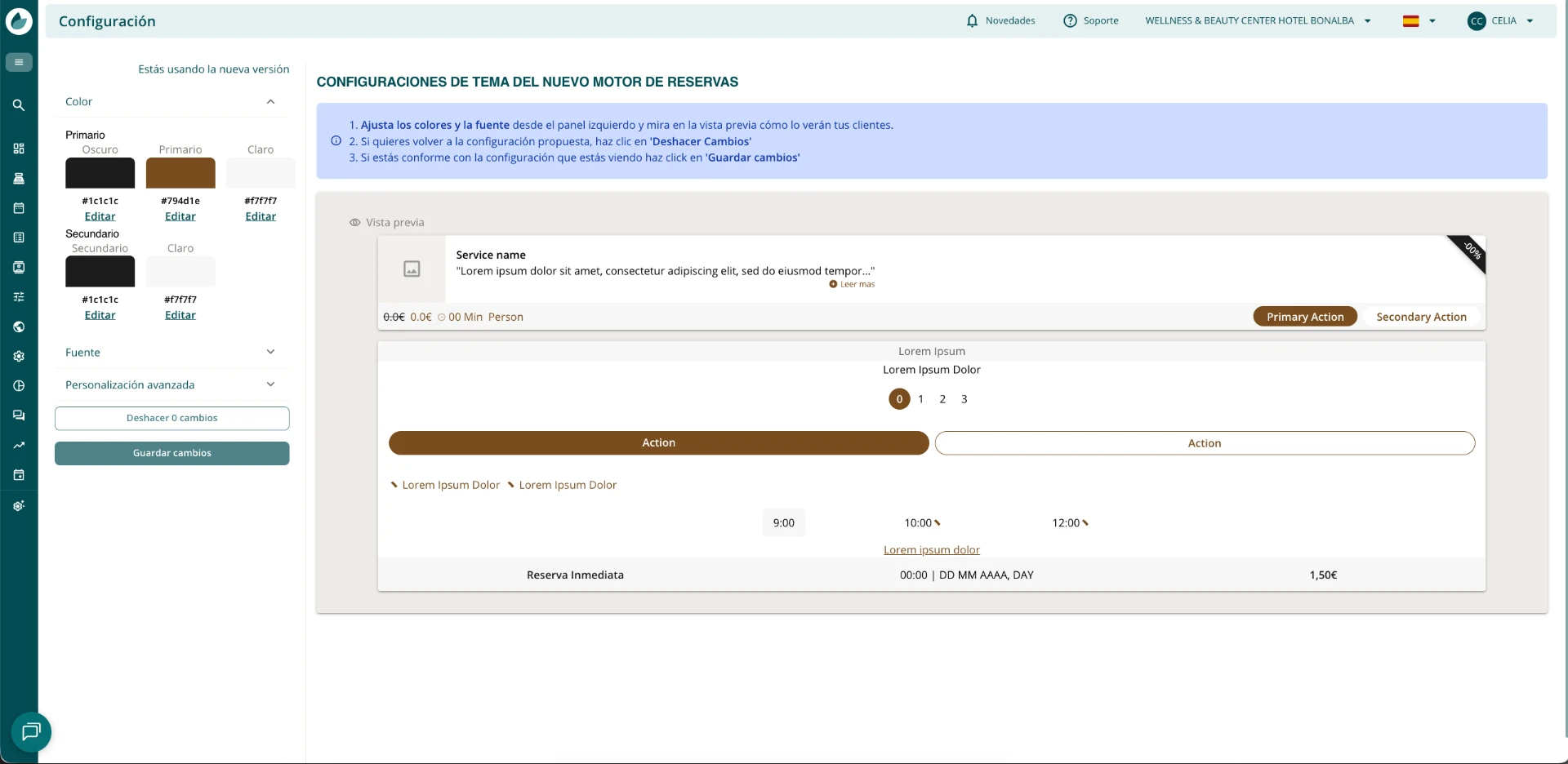
back office or theme_*? The back office is the source of truth and the path for non-technical clients. The theme_* / data-siana-theme-* from case S are used to force or preview a specific variant directly from the integration, and they override what is configured in the panel as long as they are present.
Advanced integration
Control the engine from your code
Once embed.js is loaded, it exposes window.SianaBooking: a global API with the same attributes in object form. Useful when the button is built at runtime or from a framework.
// Open the engine from JS (default modal)
window.SianaBooking.open()

// Open a specific service in a drawer
window.SianaBooking.open({
  service: '4165d3bc-bf21-5273-a598-d1d308aedf9e',
  mode: 'drawer',
  chrome: 'minimal',
  drawerSide: 'right',
  drawerWidth: 'min(560px,80vw)'
})

// Open the confirmation of a purchase
window.SianaBooking.open({
  locator: 'abcd-1234-efgh-5678',
  pin: 'fdd2bt',
  mode: 'drawer'
})

// Mount inline into an element
window.SianaBooking.mount(document.getElementById('booking-slot'), {
  chrome: 'minimal',
  minHeight: 640
})

// Close the active overlay
window.SianaBooking.close()
Listen to what's happening inside
The engine emits events to the host via postMessage v1. You receive them with SianaBooking.on(event, handler).
window.SianaBooking.on('ready',            () => console.log('engine ready'))
window.SianaBooking.on('open',             () => console.log('overlay open'))
window.SianaBooking.on('close',            () => console.log('overlay closed'))
window.SianaBooking.on('booking:complete', booking => {
  // { id, reference, total, currency }
  myAnalytics.track('purchase', booking)
})
window.SianaBooking.on('error', err => {
  // { code, message } — recoverable error, the engine is still alive
  console.warn('[engine]', err.code, err.message)
})
window.SianaBooking.on('cart:count', ({ count }) => {
  // number of items in the cart — paint a badge on your "Book" button
  var badge = document.querySelector('#mi-badge')
  if (badge) badge.textContent = count
})
For integrations that do not require a return page (Stripe), subscribe to booking:complete for tracking. Use cart:count to display an item counter over your opening button. You don't need to create anything else.
A cart counter over your button
The engine notifies you every time the number of items in the cart changes with the cart:count event. Subscribe and display a badge over your "Book" button, just like in any online store. Copy-paste as is:
<button id="reservar" data-siana-open data-siana-mode="drawer">
  Book
  <span id="cart-badge" hidden>0</span>
</button>

<script src="https://reservas.tuhotel.com/embed.js"></script>
<script>
  var badge = document.getElementById('cart-badge')
  function wire () {
    if (!window.SianaBooking) return false
    window.SianaBooking.on('cart:count', function (e) {
      badge.textContent = e.count
      badge.hidden = e.count === 0          // hide it when empty
    })
    return true
  }
  // embed.js might load later: retry until it exists
  if (!wire()) { var n = 0; var t = setInterval(function () { if (wire() || ++n > 100) clearInterval(t) }, 50) }
</script>
The count is also emitted upon opening (with whatever the customer had saved in the cart), so the badge appears correct from the start. The data is just a number — it does not contain reservation information.
Cart and navigation survive
If the customer adds something to the cart, browses your website, and returns to the engine's page, the cart is still there (up to 6 hours). It's isolated by your website's domain, so two different sites that embed the same engine never share a cart.
In a generic opening (without data-siana-service or another specific intent), the engine also reopens where the customer left off (last service page or catalog). If you open with an explicit intent (service, date, purchase-mode, view=widget, preset, locator), what arrives takes precedence and it does not resume.
<!-- reopens where the customer left off, with their cart -->
<button data-siana-open data-siana-mode="drawer">Book</button>

<!-- always starts in the catalog (cart intact) -->
<button data-siana-open data-siana-mode="drawer" data-siana-fresh>New booking</button>
data-siana-fresh only resets navigation: it ignores resumption and enters the catalog. It does not empty the cart — that's the customer's selection and silently deleting it is frustrating. If in the future you also need to empty the cart, a separate explicit attribute would be added.
CSP & sandbox
If your site publishes a Content Security Policy (CSP), add the engine's domain to the directives:
Content-Security-Policy:
  frame-src https://reservas.tuhotel.com;
  script-src https://reservas.tuhotel.com
Do not use sandbox in the iframe. If your platform forces it, make sure to include allow-forms, allow-scripts, allow-same-origin, allow-popups and allow-top-navigation — without the latter, the payment step fails.
Diagnosis
Any invalid value in a data-siana-* is ignored with a console warning prefixed by [Siana]. To inspect the status:
window.SianaBooking.diagnose()
// {
//   engineOrigin: 'https://reservas.tuhotel.com',
//   protocolVersion: 1,
//   modalOpen: false,
//   inlineFrames: 1,
//   lastError: null
// }
If embed.js never loads, check: (1) the script URL, (2) your CSP's script-src header, (3) that the domain resolves DNS. The SDK also monitors ERR_BLOCKED_BY_ORB errors — this usually means that embed.js is not served with the JavaScript MIME type.
Analytics: GA4, Meta Pixel and Tag Manager
The engine emits ten e-commerce events to three independent destinations. To activate them, provide us with your identifiers and we will configure them in your center's profile.
| Tool | What you provide us | Purpose |
|---|---|---|
| Google Analytics 4 | your measurement ID (G-XXXXXXXXXX) |
Receives the ten events with their full e-commerce payload: amount, currency, items, quantities. This is the source for funnel and conversion reports. |
| Meta Pixel | your pixel ID | Receives the same events translated to Meta's nomenclature, with a reduced payload. Used for custom audiences and to measure Facebook and Instagram campaigns. |
| Google Tag Manager | your container ID (GTM-XXXXXX) |
Receives each event as a triggerable object in dataLayer, with e-commerce fields grouped under ecommerce. Allows you to set up your own tags without us touching the engine. |
| Event | When it fires | In Meta Pixel |
|---|---|---|
page_view |
User changes page | PageView |
view_item_list |
User views the service list | ViewContent |
select_item |
User clicks on a service card | ViewContent |
view_item |
User opens a service's detail page | ViewContent |
add_to_cart |
User adds a service to the cart | AddToCart |
remove_from_cart |
User removes a service from the cart | RemoveFromCart |
view_cart |
User opens the cart | ViewContent |
begin_checkout |
User enters checkout | InitiateCheckout |
add_payment_info |
User initiates payment | AddPaymentInfo |
purchase |
User's purchase is confirmed | Purchase |
Consent
The engine implements Consent Mode v2 and starts with all permissions denied. Analytical consent enables GA4; marketing consent enables Meta Pixel. They are independent, so a user can accept one and reject the other. Practical consequence: your figures will be lower than actual traffic, and that difference is the people who do not accept cookies.
If you don't provide us with any identifier, no third-party scripts are loaded: the engine sends nothing anywhere. Each event is also enriched with the active currency and the name of the center, which allows segmenting chains without further configuration.
If your website has already requested consent
If your website has its own cookie manager (CMP) and the visitor has already accepted or rejected, pass that decision to the engine so they are not asked twice. What you pass to us replaces the engine banner.
| Value | What it grants |
|---|---|
analytics | Analytics only (GA4) |
marketing | Marketing only (Meta Pixel) |
analytics,marketing | Both |
accept-all | Both |
reject-all · necessary-only | Neither: no analytics scripts are loaded |
Embedded engine (modal, drawer or inline)
The engine banner does not appear inside the iframe: consent is always decided by your website. The engine does not remember it between visits, so your website must pass it on with every load. If it is not received, no analytics scripts are loaded. There are three ways, which can be combined:
data-siana-cookiesattribute on the engine button or container, with one of the values in the table. Useful when you already know the decision when rendering the page.SianaBooking.setConsent({ analytics, marketing })from your CMP notice, when the visitor accepts or changes their choice. It does not reload the engine, so neither the cart nor the payment step is lost. You can call it before the engine opens: it is delivered as soon as the engine is ready.siana_cookiesparameter in the URL of your own page (for example?siana_cookies=analytics,marketing), with the same values.
<!-- Si ya sabes la decisión al cargar la página -->
<button data-siana-open data-siana-cookies="analytics,marketing">Reservar</button>

<script>
  // En el aviso de tu gestor de cookies, cuando el visitante acepta o cambia su elección
  SianaBooking.setConsent({ analytics: true, marketing: false })
</script>
External link (redirection)
The engine opens on its own page and displays its banner. To avoid showing it again, add the cookies parameter to the link with the decision your CMP has already collected, for example https://tu-spa.bysiana.com/?cookies=analytics,marketing. The engine saves it and does not ask again on that domain.
Generate the link with the visitor’s actual decision at that moment. Do not leave a fixed ?cookies=accept-all in your HTML: it would grant consent for someone who has not given it.
Coming from the previous engine? The parameters utb_consent_google-ga4, utb_consent_google-tagmanager and utb_consent_facebook (value 1 or 0) still work: Google corresponds to analytics and Facebook to marketing.
Frequently asked questions: reusing existing analytics
Can I use the same GA4, Meta Pixel and GTM IDs that I already use on my website?
Yes, without restriction. There is no need to create another measurement ID, another pixel ID or another GTM container. You provide them and we configure them in your center’s record. Events arrive in the same properties and accounts as those from your website.
Do I need to configure cross-domain tracking or give you a session ID?
It depends on the domain from which the engine is served. This rule applies to both external links and embedded engines.
- Your own subdomain (CNAME, for example
reservas.tuweb.com): shares the GA4 and Meta Pixel session with your website, provided you use the same IDs. There is no need to configure cross-domain tracking or give us any session ID. - Siana domain (
*.bysiana.com): it is a different domain, so the session does not continue. If you use analytics, we recommend using your own subdomain.
It is worth checking this with GA4 DebugView and Meta’s test events tool.
Does the purchase event work with Redsys and Stripe?
Yes, purchase is recorded in the same way with any payment gateway. There is no incompatibility with Stripe or any other payment method. One caveat: with gateways that redirect (Redsys, CECA, Reduniq), Meta Pixel does not deduplicate by event ID, so a retry or a reload after payment may duplicate Purchase in Meta. GA4 does deduplicate by transaction_id. Check the Meta figure before relying on it.
Can I deploy GA4 and Meta Pixel from a single GTM container?
Yes. Give us only the container ID (GTM-XXXXXX), without the GA4 measurement ID or the Meta pixel ID. If you provide all three and your container already fires those same tags, events are duplicated, because the engine loads each destination independently. The engine sends each event to the dataLayer with its ecommerce payload (value and currency).
What happens to my cookie manager (CMP) if I embed the engine?
The engine banner is not shown inside the iframe: your website passes the visitor’s decision on every load. If it is not received, no analytics scripts are loaded. How to do it, with an example: If your website has already requested consent.
Can I rename the events (for example, purchase_spa) so they do not get mixed up with another website or another booking engine?
We recommend not doing so. GA4 only counts the purchase event as a purchase: a purchase_spa would arrive as a custom event, with no revenue. To separate the engine’s data it is enough to filter by host name (the engine’s domain) or by product brand (item_brand, the centre’s name), which is already in every event. If you still want your own names, do it from your Google Tag Manager: you only give us the container ID and, inside it, you decide which name each event reaches GA4 with.
Do I have to configure anything in GA4 because of the payment gateway?
Yes: add the gateway’s domain (for example, sis.redsys.es) to “Unwanted referrals” in GA4 (Admin → Data streams → Configure tag settings). That way, when the buyer returns from the payment, GA4 does not open a new session attributed to the bank.
I see the dataLayer empty, why?
There are two possible reasons, and both are normal: we have not configured your IDs yet, or the visitor has not accepted the cookies in the engine’s banner. To check, go into the engine, accept the cookies and type dataLayer in the browser console.
Reference
Complete attribute table
All data-siana-* attributes recognized by SDK v1. They are placed on the element that opens or embeds the engine: a button with data-siana-open, or a container with data-siana-inline.
| Attribute | Value | Effect |
|---|---|---|
| data-siana-open | (no value) | Marks an element as the trigger for the overlay (modal or drawer) |
| data-siana-inline | (no value) | Marks a container to embed the engine directly on the page |
| data-siana-auto-open | (no value) | Triggers the click automatically when the DOM loads |
| data-siana-mode | modal · drawer | Type of overlay (default modal). Ignored in inline |
| data-siana-chrome | full · minimal | minimal hides breadcrumbs, back arrow, and center info |
| data-siana-service | UUID | Pre-selects a service (lands on its detail page) |
| data-siana-view | full · widget | widget = reservation box only (requires service) |
| data-siana-locator | 4-128 [a-z0-9-] | Points to the confirmation of an existing purchase |
| data-siana-pin | 3-128 [a-z0-9] | Auto-validated PIN (requires locator) |
| data-siana-date | YYYY-MM-DD | Pre-selected date |
| data-siana-locale | es · en · fr · … | Initial engine language |
| data-siana-drawer-side | right · left | Drawer side (default right) |
| data-siana-drawer-width | CSS length | Drawer width (default min(480px,80vw)) |
| data-siana-modal-width | px · % | Modal width |
| data-siana-modal-height | px · % | Modal height |
| data-siana-min-height | px | Initial inline height before the first resize |
| data-siana-session-id | 1-128 [A-Za-z0-9_-] | Your booking reference — returns in the handoff for correlation |
| data-siana-item-id | 1-128 [a-z0-9_-] | Item to remove (delete mode) → the engine emits cart:remove |
| data-siana-callback-url | https URL | Server-side endpoint that receives the same handoff payload via POST |
| data-siana-purchase-mode | voucher · appointment · both | Filters the catalog: only vouchers, only appointments, or both (default both) |
| data-siana-exp | category slug | Filters the catalog to a category (its slug in Siana) |
| data-siana-channel | channel slug | Applies a channel with its own prices and conditions (configured in Siana) |
| data-siana-currency | ISO 4217 (EUR, GBP…) | Initial display currency |
| data-siana-group | group identifier | Pre-selects the client group |
| data-siana-hide-add-to-cart | 1 · true | Hides the "add to cart" button (direct purchase, no basket) |
| data-siana-fresh | 1 · true | Opens fresh: ignores route resumption and enters the catalog. Does not touch the cart (see persistence) |